
Vallenta Studio
Object Pascal Inside VS Code
Vallenta Studio is professional-grade Delphi tooling, optimized for the VS Code environment. Set breakpoints and inspect variables. Navigate to declarations. Build with MSBuild. Manage projects - all without leaving VS Code.
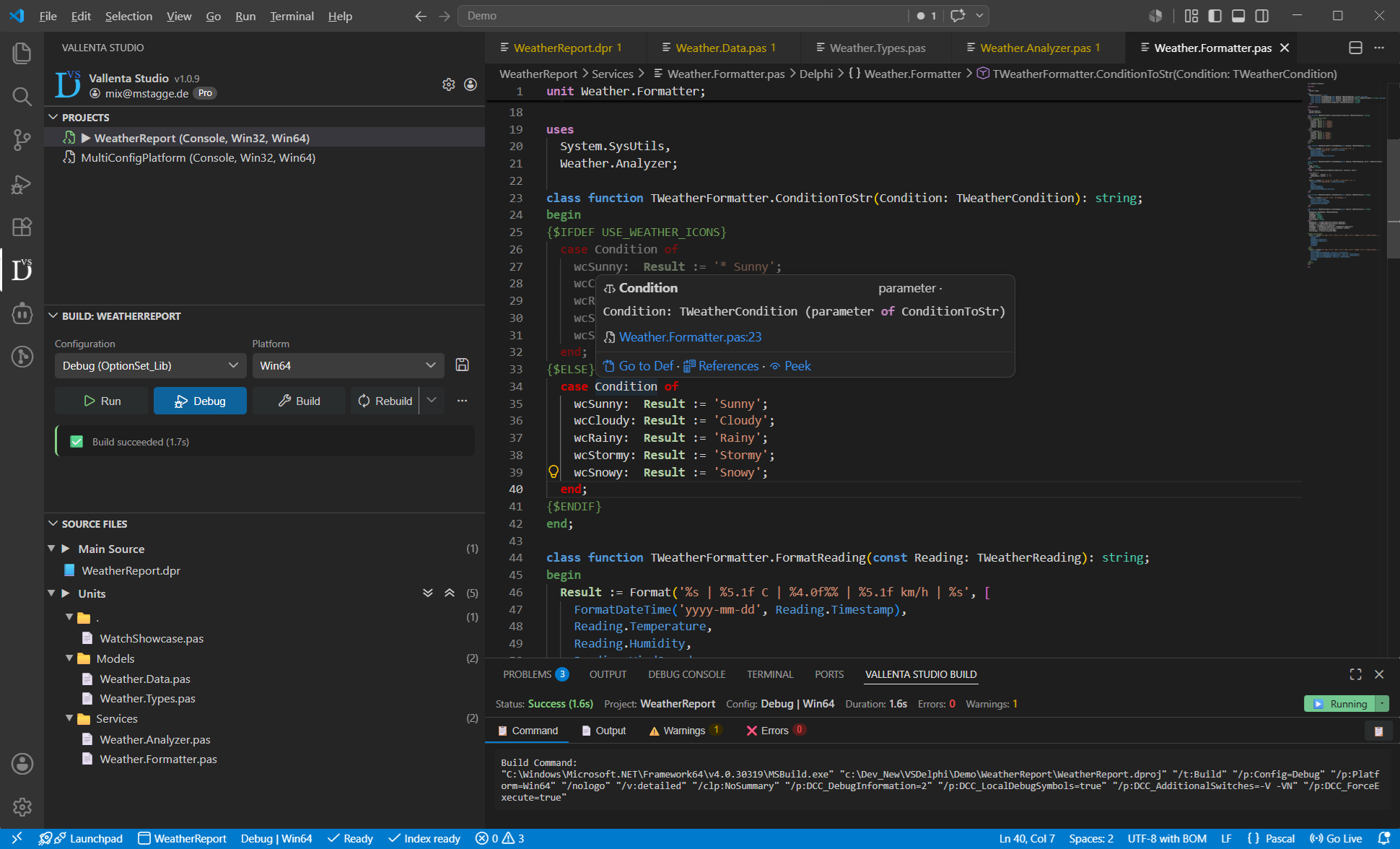
Everything
Vallenta Studio Delivers
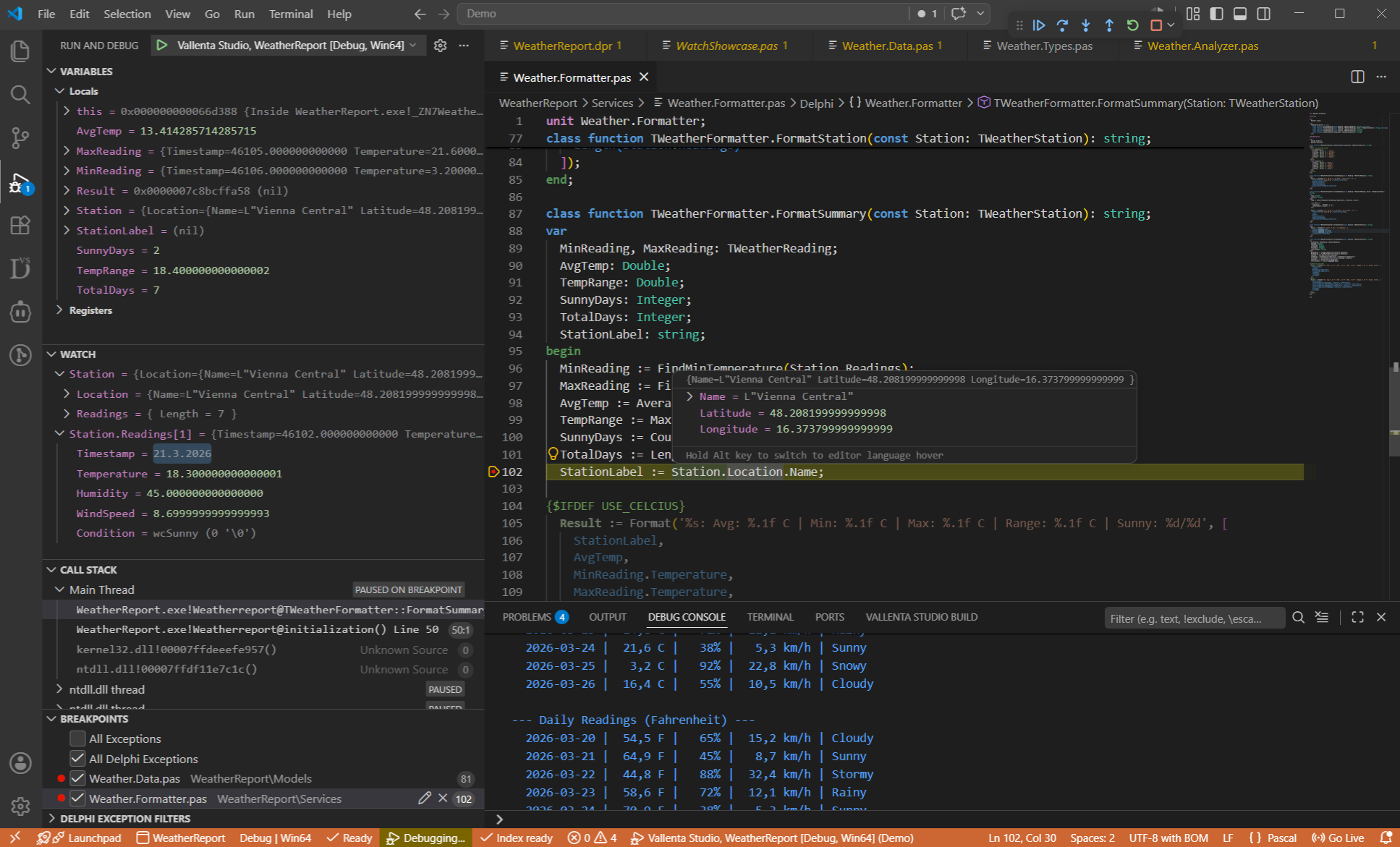
Source-Level Debugging
Real Delphi debugging — natively inside VS Code
- Breakpoints with per-project persistence
- Step into / over / out from the VS Code debug toolbar
- Watch expressions & call-stack navigation
- Edit variable values live during a debug session
- Exception handling — breaks on raised Delphi exceptions and unwinds the Delphi stack back to the raise site
- Resolves complete symbol chains across objects, records & interfaces (e.g. WeatherData.Formatter.ReadData)
- Natvis visualizers for Delphi objects with Pascal type rendering
Linux Debugging
Linux64 projects deployed to and debugged on a Linux machine, from VS Code
- Compiled on Windows, deployed and debugged on Linux: breakpoints, stepping, call stack, locals and Watch expressions in Delphi syntax
- No PAServer and no SDK registration; the Linux machine runs VallentaAgent and its distribution's lldb-server
- Sysroots for Ubuntu 22.04, 24.04 and 26.04, prepared by the Linux Distributions panel
- Deployment per build configuration: target, working directory and files, with a live view of the target layout
- Program output and standard input in an integrated terminal
Form Designer
VCL .dfm forms designed in VallentaDesigner, opened from VS Code
- A component palette built from the packages installed in Delphi, with icons, favourites and search
- An object inspector backed by the IDE's own property and component editors
- Fields, event handlers and renames written to the unit by Vallenta Studio
- Frames, data modules and inherited forms; unknown components preserved as written
- Free during the beta, no Pro subscription required
Code Intelligence
Navigate large codebases with native IDE precision
- Go to Declaration / Implementation — jump between an interface declaration and its implementation body (Shift+Ctrl+Up / Shift+Ctrl+Down)
- Semantic validation & diagnostics — detects undefined types, methods, and variables flagged inline, with configurable severity
- Preprocessor-aware diagnostics (no false errors in {$IFDEF}-excluded code)
- Ctrl+Click Go to Definition
- Hover type signatures
- Find Symbol and Find All References (incl. .dfm/.fmx)
MCP Server for AI Agents
The IDE's Delphi model, read by GitHub Copilot agent mode, Claude Code and any MCP client
- Find symbol, references, implementations, go to definition, completion, outline, diagnostics and inactive {$IFDEF} regions, answered by the language server
- Project configuration, platform switching and builds with structured errors and warnings
- Local server on 127.0.0.1 with a bearer token; discovered by VS Code 1.102 and later, registered with Claude Code in one click
- Debugging over MCP: coming soon
Rename Refactoring
Safe, project-wide symbol rename - press F2
- Rename a symbol and every use across the project — declaration, implementation and references
- Covers locals, inline vars, types, routines, variables, constants and type members
- Updates references in .dfm/.fmx forms — event handlers like Button1Click and component properties
- Clashing or unsafe renames are blocked with a clear explanation
Project Editor
Visual .dproj and .optset configuration editor - edit projects and Option Sets without leaving VS Code
- Configuration hierarchy (Base / Debug / Release)
- Multi-platform side-by-side editing
- Raw and resolved property values
- Purpose-built editors (toggles, dropdowns, pickers)
- Live sync to your project file
Build System
Full MSBuild integration with configuration and platform selectors
- One-click Build, Clean, and Rebuild
- Configuration and Platform selectors in the toolbar
- Build output with inline warnings and errors
- Run without debugging (Ctrl+F5)
- VS Code task integration
Project Management
A dedicated sidebar for every project in your workspace - just one click away
- Project Explorer with source file tree
- .dproj, .dpk, and .groupproj support
- Active project and build config switching
- Recent projects and session persistence
- Auto-detect Delphi installation from registry
Powered by a Custom LSP
Vallenta Studio ships with a dedicated language server built from the ground up for Object Pascal. Non-blocking multithreaded architecture, rock-stable, and independent of the compiler - real-time analysis using TreeSitter parsing.
Multi-Tier Indexing
Vallenta's LSP splits its symbol index into three tiers - the Delphi RTL/VCL/FMX, your third-party libraries, and your project sources - each persisted to its own on-disk cache. The RTL tier is shared across every project using the same Delphi version, libraries are shared per platform, and only your project itself needs per-project indexing. When you open a project, cached symbols load instantly so hover, completion, and go-to-definition work right away, while all three tiers update in parallel in the background and only re-parse files that actually changed.
Offline Symbol Cache
Symbol data is persisted to an offline cache. When you reopen a project, the LSP restores its index instantly - no full re-scan needed. Ready in seconds, not minutes.
Real-Time TreeSitter Analysis
Code is parsed in real time using a custom TreeSitter grammar for Object Pascal. Syntax errors, outline, hover, and navigation update as you type - without invoking the compiler.
Cross-Unit Symbol Resolution
The LSP resolves symbols across units, tracking uses-clauses and interface/implementation sections. Go to Definition works across your entire project, not just the current file.
Start Building, Go Further
Everything you need to build and run Projects is free. Unlock debugging, code navigation, and semantic analysis with Pro.
Free
Build, run, and manage Projects in VS Code. Includes a 5-day free trial with all Pro features. No credit card required.
69€
/yearThe complete IDE experience - debug, navigate, and validate your code.
All plans include up to 3 concurrent devices
Up and Running in Minutes
Install
Search for 'Vallenta Studio' in the VS Code Marketplace and install. The extension auto-detects your Delphi installation.
No Config
Zero setup required. All build paths and MSBuild executables are detected automatically. Just select your Delphi version if multiple are installed.
Add Projects
Use the Project Explorer to add .dproj files or entire project groups. Set your active project and build configuration.
Build & Debug
One click to build, run, or debug directly from the Vallenta Studio build panel. Set breakpoints, inspect variables, and step through your code.
Vallenta Studio
Awaits
Register for free and start building with Vallenta Studio. Get the full IDE experience - debugging, code navigation, and more - with Pro.